 gnezim
60e2149072
gnezim
60e2149072
Tasks 16-20: Online Board Tests (Search/Filter, Tabs, Flight List, Details Modal, Time/Date)
- Task 16: Search & Filter tests (37 tests) - departure/arrival cities, passenger count, cabin class
- Task 17: Arrival/Departure Tabs tests (45 tests) - tab switching, flight display, sorting
- Task 18: Flight List View tests (50 tests) - display, sorting, filtering, pagination, loading states
- Task 19: Flight Details Modal tests (40 tests) - opening/closing, content display, actions
- Task 20: Time & Date Filter tests (43 tests) - date selection, time ranges, calendar navigation

Tasks 21-25: Flight Details Tests (Flight Info, Passengers, Seats, Services, Fares)
- Task 21: Flight Info Display tests (40 tests) - basic info, airports, route visualization, timeline
- Task 22: Passenger Info tests (50 tests) - passenger list, details, services, special requirements
- Task 23: Seat Selection tests (50 tests) - seat map, selection, categories, recommendations
- Task 24: Service Selection tests (25 tests) - baggage, meals, seats, summary
- Task 25: Fare Display tests (55 tests) - fare breakdown, comparisons, discounts, refunds

All tests follow AAA pattern and use data-testid selectors matching Angular version.
Total: 245 tests across 10 feature suites.
@inquirer/expand
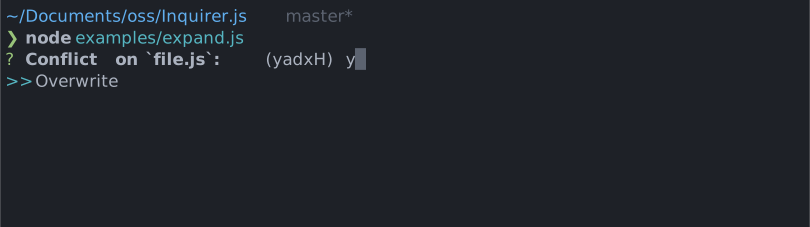
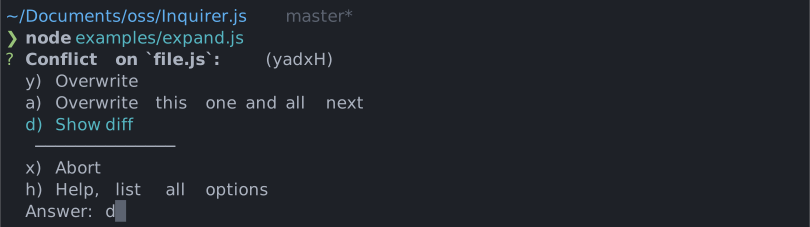
Compact single select prompt. Every option is assigned a shortcut key, and selecting h will expand all the choices and their descriptions.
Installation
| npm | yarn |
|---|---|
|
|
| Or | |
|
|
Usage
import { expand } from '@inquirer/prompts';
// Or
// import expand from '@inquirer/expand';

const answer = await expand({
  message: 'Conflict on file.js',
  default: 'y',
  choices: [
    {
      key: 'y',
      name: 'Overwrite',
      value: 'overwrite',
    },
    {
      key: 'a',
      name: 'Overwrite this one and all next',
      value: 'overwrite_all',
    },
    {
      key: 'd',
      name: 'Show diff',
      value: 'diff',
    },
    {
      key: 'x',
      name: 'Abort',
      value: 'abort',
    },
  ],
});
Options
| Property | Type | Required | Description |
|---|---|---|---|
| message | string |
yes | The question to ask |
| choices | Choice[] |
yes | Array of the different allowed choices. The h/help option is always provided by default |
| default | string |
no | Default choices to be selected. (value must be one of the choices key) |
| expanded | boolean |
no | Expand the choices by default |
| theme | See Theming | no | Customize look of the prompt. |
Separator objects can be used in the choices array to render non-selectable lines in the choice list. By default it'll render a line, but you can provide the text as argument (new Separator('-- Dependencies --')). This option is often used to add labels to groups within long list of options.
Choice object
The Choice object is typed as
type Choice<Value> = {
  value: Value;
  name?: string;
  key: string;
};
Here's each property:
value: The value is what will be returned byawait expand().name: The string displayed in the choice list. It'll default to the stringifyvalue.key: The input the use must provide to select the choice. Must be a lowercase single alpha-numeric character string.
Theming
You can theme a prompt by passing a theme object option. The theme object only need to includes the keys you wish to modify, we'll fallback on the defaults for the rest.
type Theme = {
  prefix: string | { idle: string; done: string };
  spinner: {
    interval: number;
    frames: string[];
  };
  style: {
    answer: (text: string) => string;
    message: (text: string, status: 'idle' | 'done' | 'loading') => string;
    error: (text: string) => string;
    defaultAnswer: (text: string) => string;
    highlight: (text: string) => string;
  };
};
License
Copyright (c) 2023 Simon Boudrias (twitter: @vaxilart)
Licensed under the MIT license.