 gnezim
60e2149072
gnezim
60e2149072
Tasks 16-20: Online Board Tests (Search/Filter, Tabs, Flight List, Details Modal, Time/Date)
- Task 16: Search & Filter tests (37 tests) - departure/arrival cities, passenger count, cabin class
- Task 17: Arrival/Departure Tabs tests (45 tests) - tab switching, flight display, sorting
- Task 18: Flight List View tests (50 tests) - display, sorting, filtering, pagination, loading states
- Task 19: Flight Details Modal tests (40 tests) - opening/closing, content display, actions
- Task 20: Time & Date Filter tests (43 tests) - date selection, time ranges, calendar navigation

Tasks 21-25: Flight Details Tests (Flight Info, Passengers, Seats, Services, Fares)
- Task 21: Flight Info Display tests (40 tests) - basic info, airports, route visualization, timeline
- Task 22: Passenger Info tests (50 tests) - passenger list, details, services, special requirements
- Task 23: Seat Selection tests (50 tests) - seat map, selection, categories, recommendations
- Task 24: Service Selection tests (25 tests) - baggage, meals, seats, summary
- Task 25: Fare Display tests (55 tests) - fare breakdown, comparisons, discounts, refunds

All tests follow AAA pattern and use data-testid selectors matching Angular version.
Total: 245 tests across 10 feature suites.
5.7 KiB
@inquirer/select
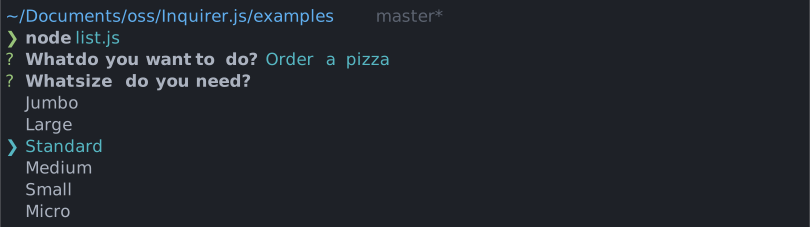
Simple interactive command line prompt to display a list of choices (single select.)
Installation
| npm | yarn |
|---|---|
|
|
| Or | |
|
|
Usage
import { select, Separator } from '@inquirer/prompts';
// Or
// import select, { Separator } from '@inquirer/select';

const answer = await select({
  message: 'Select a package manager',
  choices: [
    {
      name: 'npm',
      value: 'npm',
      description: 'npm is the most popular package manager',
    },
    {
      name: 'yarn',
      value: 'yarn',
      description: 'yarn is an awesome package manager',
    },
    new Separator(),
    {
      name: 'jspm',
      value: 'jspm',
      disabled: true,
    },
    {
      name: 'pnpm',
      value: 'pnpm',
      disabled: '(pnpm is not available)',
    },
  ],
});
Options
| Property | Type | Required | Description |
|---|---|---|---|
| message | string |
yes | The question to ask |
| choices | Choice[] |
yes | List of the available choices. |
| default | string |
no | Defines in front of which item the cursor will initially appear. When omitted, the cursor will appear on the first selectable item. |
| pageSize | number |
no | By default, lists of choice longer than 7 will be paginated. Use this option to control how many choices will appear on the screen at once. |
| loop | boolean |
no | Defaults to true. When set to false, the cursor will be constrained to the top and bottom of the choice list without looping. |
| theme | See Theming | no | Customize look of the prompt. |
Separator objects can be used in the choices array to render non-selectable lines in the choice list. By default it'll render a line, but you can provide the text as argument (new Separator('-- Dependencies --')). This option is often used to add labels to groups within long list of options.
Choice object
The Choice object is typed as
type Choice<Value> = {
  value: Value;
  name?: string;
  description?: string;
  short?: string;
  disabled?: boolean | string;
};
Here's each property:
value: The value is what will be returned byawait select().name: This is the string displayed in the choice list.description: Option for a longer description string that'll appear under the list when the cursor highlight a given choice.short: Once the prompt is done (press enter), we'll useshortif defined to render next to the question. By default we'll usename.disabled: Disallow the option from being selected. Ifdisabledis a string, it'll be used as a help tip explaining why the choice isn't available.
choices can also be an array of string, in which case the string will be used both as the value and the name.
Theming
You can theme a prompt by passing a theme object option. The theme object only need to includes the keys you wish to modify, we'll fallback on the defaults for the rest.
type Theme = {
  prefix: string | { idle: string; done: string };
  spinner: {
    interval: number;
    frames: string[];
  };
  style: {
    answer: (text: string) => string;
    message: (text: string, status: 'idle' | 'done' | 'loading') => string;
    error: (text: string) => string;
    help: (text: string) => string;
    highlight: (text: string) => string;
    description: (text: string) => string;
    disabled: (text: string) => string;
    keysHelpTip: (keys: [key: string, action: string][]) => string | undefined;
  };
  icon: {
    cursor: string;
  };
  indexMode: 'hidden' | 'number';
};
theme.style.keysHelpTip
This function allows you to customize the keyboard shortcuts help tip displayed below the prompt. It receives an array of key-action pairs and should return a formatted string. You can also hook here to localize the labels to different languages.
It can also returns undefined to hide the help tip entirely. This is the replacement for the deprecated theme option helpMode: 'never'.
theme: {
  style: {
    keysHelpTip: (keys) => {
      // Return undefined to hide the help tip completely.
      return undefined;

      // Or customize the formatting. Or localize the labels.
      return keys.map(([key, action]) => `${key}: ${action}`).join(' | ');
    };
  }
}
theme.indexMode
Controls how indices are displayed before each choice:
hidden(default): No indices are shownnumber: Display a number before each choice (e.g. "1. Option A")
License
Copyright (c) 2023 Simon Boudrias (twitter: @vaxilart)
Licensed under the MIT license.